Offline clinical transcription. For free.
Notes for Mac transcribes patient visits and generates clinical notes right on your Mac. No internet needed.
- Works fully offline
- Audio never leaves your Mac
- Free, no account needed
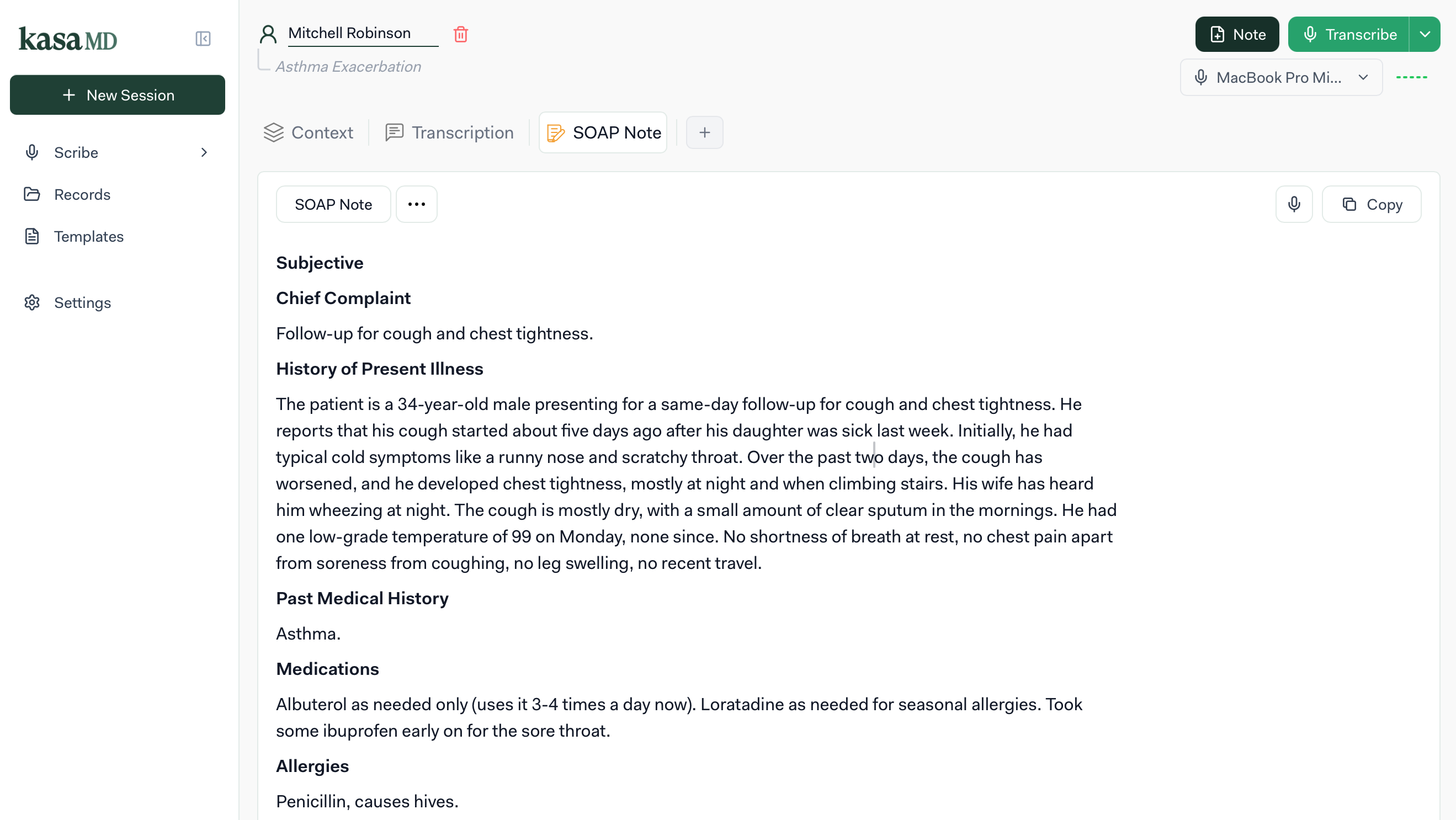
From conversation to chart in three steps
- 1
Record the visit
Start a session and talk with your patient as you normally would. KasaMD listens in the background.
- 2
Transcribe on-device
Speech is converted to text by AI models running locally on your Mac. Nothing is uploaded.
- 3
Get a finished note
Pick a SOAP, HPI or custom template, review the generated note, then copy or export to PDF.
Everything you need for the note.
- 01
Offline AI transcription
Speech becomes text through AI models running on your Mac. No internet needed.
- 02
Clinical notes & templates
Turn the conversation into a SOAP, HPI or custom note, from built-in templates or your own.
- 03
Patient & session management
Keep patients organized and every visit's session saved automatically.
- 04
Medical text editor
Refine the note in a rich-text editor built for clinical writing, then export to PDF.
Your patients' data never leaves the room.
Most transcription tools stream audio to the cloud. KasaMD was built offline-first, so privacy isn't a setting. It's how the app works.
Runs entirely on your Mac
Transcription and note generation happen locally. Audio, transcripts, and notes stay on your device.
Nothing sent to our servers
There is no cloud processing step, so there is no patient data for us to store, share, or lose.
Works when the internet doesn't
Clinic, home visits, or low-connectivity environments: KasaMD keeps working anywhere.
What's included
Everything you need, with no limits

$0everything included
All features included. No credit card required. No hidden fees.
Unlimited Transcriptions
No limits on how many patient conversations you can transcribe
Unlimited Clinical Notes
Generate as many notes as you need with no restrictions
Unlimited Templates
Access all note templates including SOAP, HPI, and custom formats
Unlimited Patient Records
Manage all your patients without storage limitations
Unlimited Session History
Access complete history of all past transcription sessions
PDF Export
Export your notes to PDF format for sharing and records
Custom Templates
Create and save your own note templates
Fully Offline
Transcription and note generation run entirely on your Mac. No internet required.
Is Notes for Mac really free?
Yes. Notes for Mac is free to use with all features included: unlimited transcriptions, unlimited notes, and unlimited patient records at no cost.
Will Notes for Mac always be free?
We currently offer all features for free. In the future, we may introduce optional premium features, but the core documentation tools will remain accessible.
Are there any usage limits?
No. You get unlimited transcriptions, unlimited clinical notes, unlimited templates, and unlimited patient records.
How is my data handled?
Notes for Mac runs entirely on your Mac. Audio, transcripts, and notes stay on your device. Nothing is sent to our servers.
What types of notes can I generate?
Notes for Mac supports SOAP notes, HPI, progress notes, and custom templates. You can also create your own templates.
Do I need to download anything?
Yes. Notes for Mac is a native macOS app. Download the .dmg, drag it to Applications, and you're ready to go. No account or sign-up required.
Does it need an internet connection?
No. Notes for Mac is fully offline. Transcription and note generation run locally on your Mac, so it works anywhere: clinic, home visits, or low-connectivity environments.
What devices does it support?
Notes for Mac runs on Macs with Apple Silicon (M1 or later) and macOS 14 Sonoma or later. Support for other platforms is on our roadmap.
How accurate is the AI transcription?
On-device transcription is accurate on clear audio. Accuracy depends on audio quality, background noise, and accents. You can always edit and refine notes after generation.
Can I export my notes?
Yes, you can export notes to PDF format for sharing with colleagues or adding to patient records.
Spend less time charting.
Download Notes for Mac and turn your next patient visit into a finished note, without an internet connection.